Retail Departments
Retail departments are created and maintained in Retail > Retail items > Retail departments
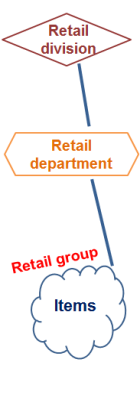
Every item belongs to one retail group and each retail group belongs to a retail department.
Retail departments can be used for reporting functionality and to create discounts for all items included in the retail groups of this department.
The Retail Departments View:
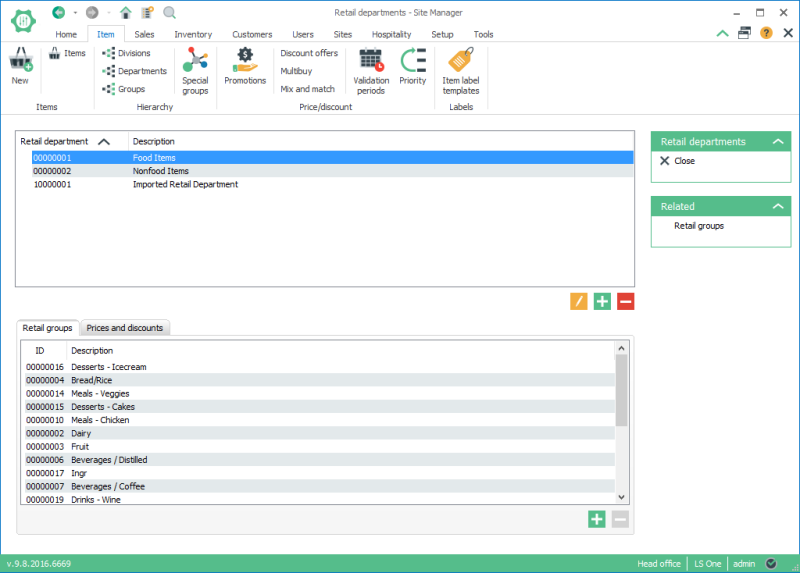
The screen is split into two sections:
- The list of retail departments in the upper list;
- The retail groups within the selected department in the lower list.
Create new retail department
To create a new retail department press the  button below the list of retail departments, this is the upper list.
When a new retail department is created the following dialog opens:
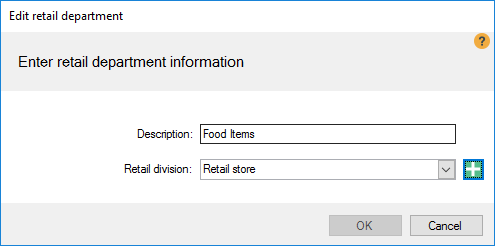
- Description allows a maximum of 60 characters.
- Every Retail departments receives an ID, a number that is automatically given to the Retail department from a number series.
Add retail groups to the department
To add a retail group to the retail department:
- select the retail department to add the retail group to.
- press the button below the list of the retail groups, the lower list.
- in the Retail group search dialog find the retail group to add and select it.
- press the select button to add the selected retail group.
See also:
| Updated: | 24th October 2016 |
| Version: | LS One 2016.1 |

